

Security Cameras & Video Storage: What We Recommend and Why
Since we started selling and installing security cameras around 2011, I’ve seen a lot of changes, but the biggest change came with the addition of cloud storage. The ability to keep your footage offsite and backed up automatically is a game changer for the home and business security world. But that doesn’t mean you should get rid of onsite storage yet...
Cloud vs. Local Camera Storage: Which is better?
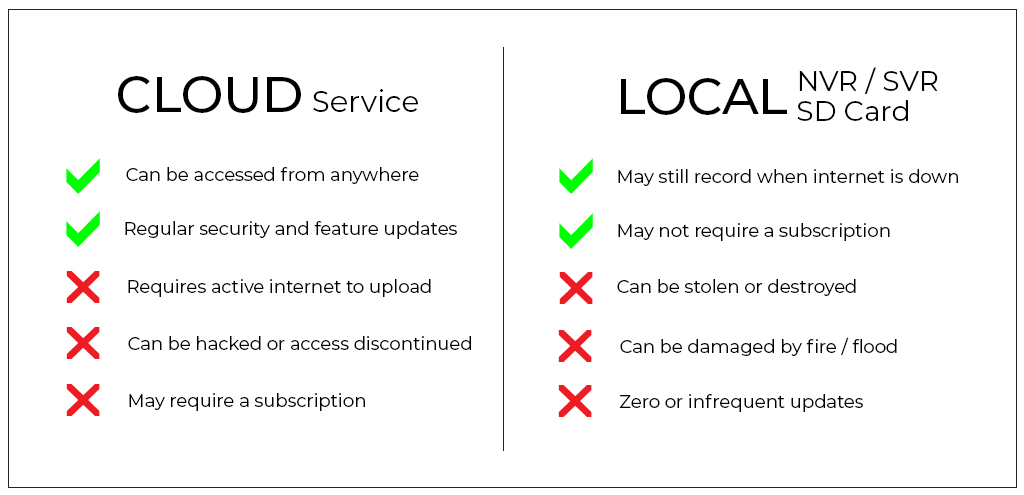
There are advantages and disadvantages to storing your recorded video on site (local) and offsite (in the cloud).
Footage stored in the cloud can be accessed from anywhere at any time, which is super convenient. But it can also be hacked, or turned off for non-payment, and space is generally limited by the provider. Whether cloud storage is your primary method or just backup, make sure it is securely encrypted. (Alarm.com is the only platform that has never been hacked.)
Local storage could be with a DVR (old-school, not recommended), NVR, SVR or SD Card. SD cards are nice because they’re inexpensive and you don’t need to keep up with another piece of equipment. Make sure SD Card Tamper Protection is included to guard against SD card tampering or theft.
NVRs (Network Video Recorders) and SVRs (Streaming Video Recorders) are similar, but an SVR has more functionality. They record even when the internet goes down, can be accessed remotely, and can store huge amounts of data. They usually require a monthly subscription, but you’ll find it well worth it. Learn Why
The Perfect Solution: A Hybrid Approach
If you’re serious about security and not just watching your chicken coop, the best option for storing your camera recordings is a hybrid solution with both local and cloud storage. Don’t put all your eggs in one basket - and don’t put all your recordings in one place.
Having access to saved high-quality video recordings is invaluable for filing insurance claims, defending liability allegations and assisting with police investigations.
My recommendation for most homes (1-4 cameras) is a hybrid camera storage system with a 128GB SD Card for each camera. For businesses (1-8 cameras) I recommend a CSVR (commercial streaming video recorder) with at least a 2TB internal hard drive. Larger commercial operations typically need more storage. Our CSVRs go up to 24TB (up to 16 cameras each) and more than one can be used on any commercial camera system.
Whether you’re a commercial enterprise with hundreds of cameras, a small business with a few, or a home with just one camera, having both local and cloud storage is the way to go.
What about Smart Clips?
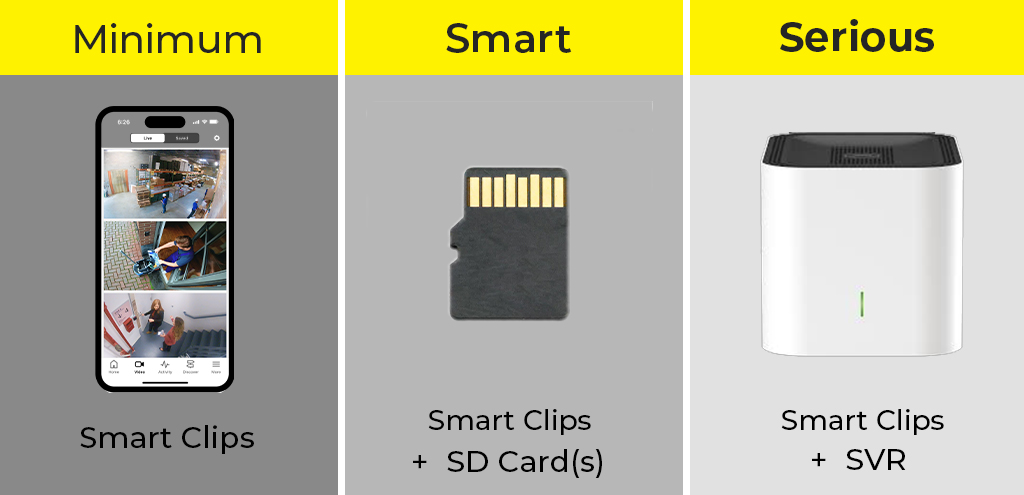
Smart clips are great, especially when they’re analytics-based (person/vehicle detection versus motion triggered). They allow you to get relevant notifications, quickly review the day’s activity, and save storage, but they’re not without limitations.
For example, if you receive a 30-second clip of an important event but want to see what happened before and after that clip, you could be out of luck.
When configuring your cameras, you choose:
- -Length of clips (usually 30-90 seconds)
- -Length between clips (to prevent an overload of notifications for the same event)
This setup could cause you to miss seeing part of a significant incident.
Adding an onboard SD card (included in DFW Security camera installations) can help bridge that gap with continuous recording 5-7 days of storage in addition to your analytics-based smart clips.
Determining Storage Requirements: How much space do I need?
There are a lot of factors that affect storage requirements.
- - How long do you want to keep your footage?
- - Do you want everything or just specific events (motion, people, vehicles, etc.)?
- - Is your budget constricted?
- - How many cameras do you need storage for?
- - How much activity will the camera capture?
- - Do you want to save audio too?
- - How important is playback quality?
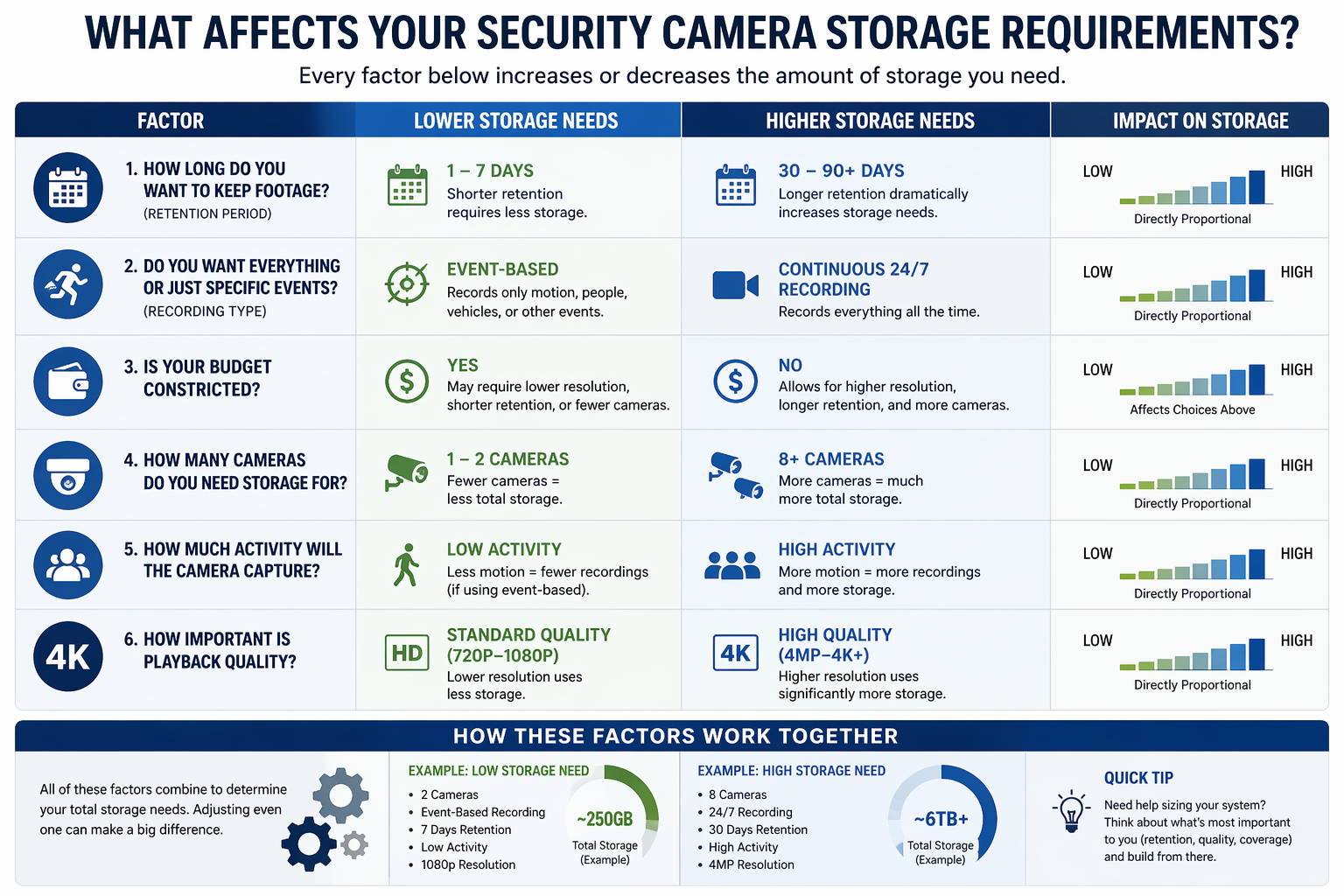
If that sounds a little complicated, 128GB per camera is a good rule of thumb for an average setup with one week of storage:
4 Cameras >> 512GB
8 Cameras >>1TB
16 Cameras >>2TB
Playback Quality: The Truth About Resolution
Playback Quality vs. Storage Tradeoffs
4K cameras are highly rated for their clear live view - but make sure you’re storing those recordings in 4K too or it won’t do much good. And keep in mind that storing higher resolution video requires more storage space.
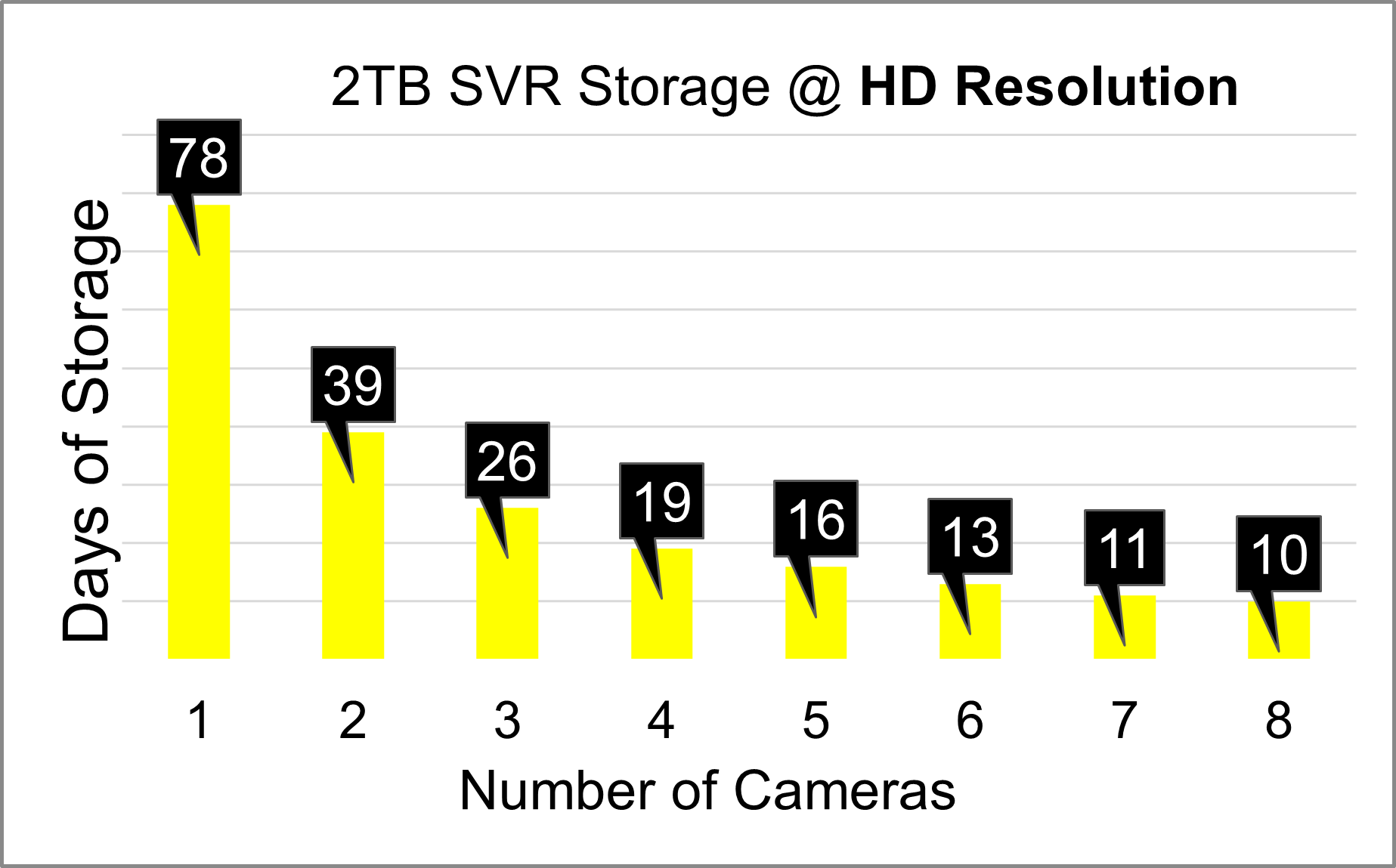
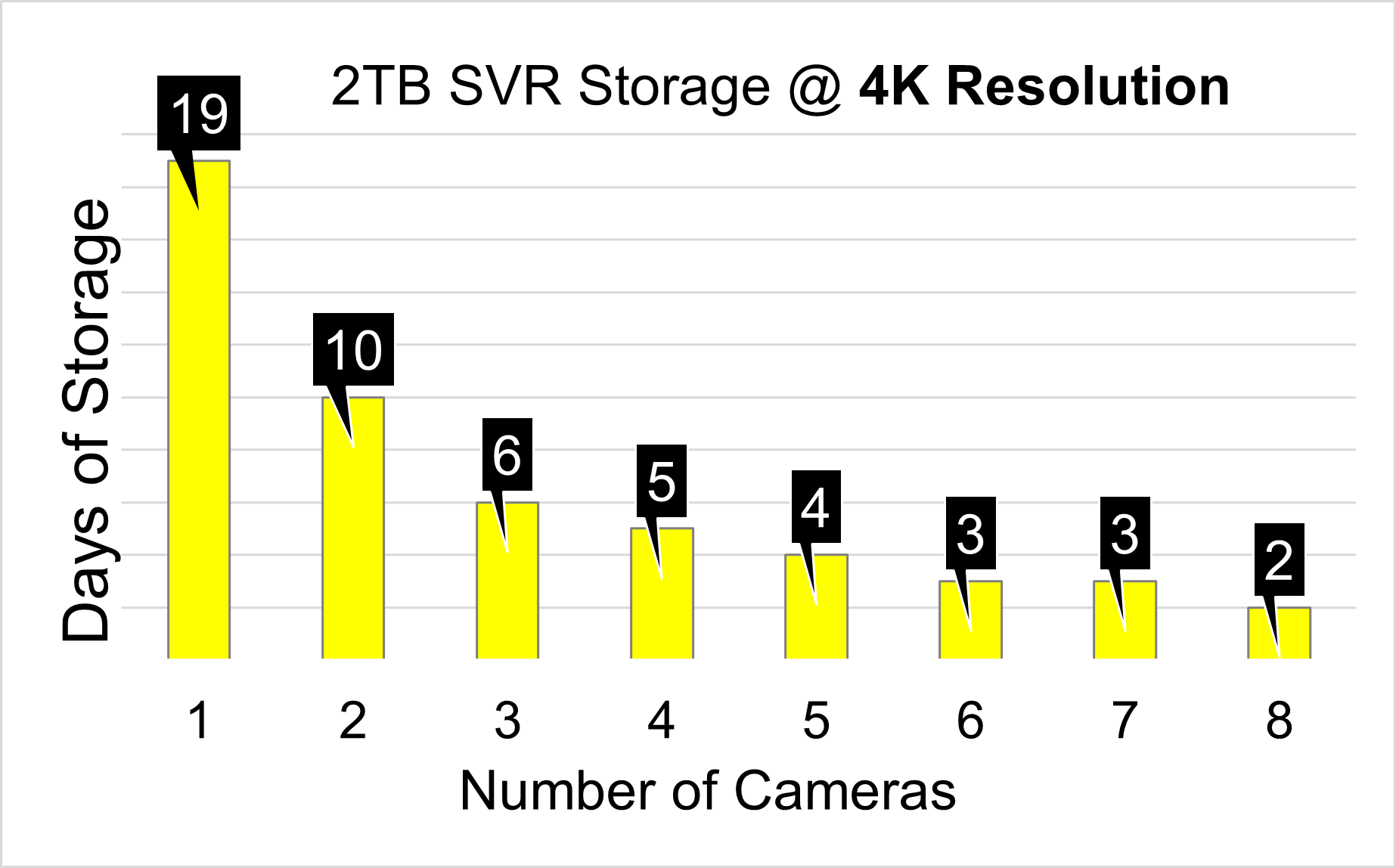
For example, in a typical residential setup with a 2TB streaming video recorder (SVR), you’ll be able to store about 19 days of HD recordings, but only about 5 days if you choose the higher 4K resolution.
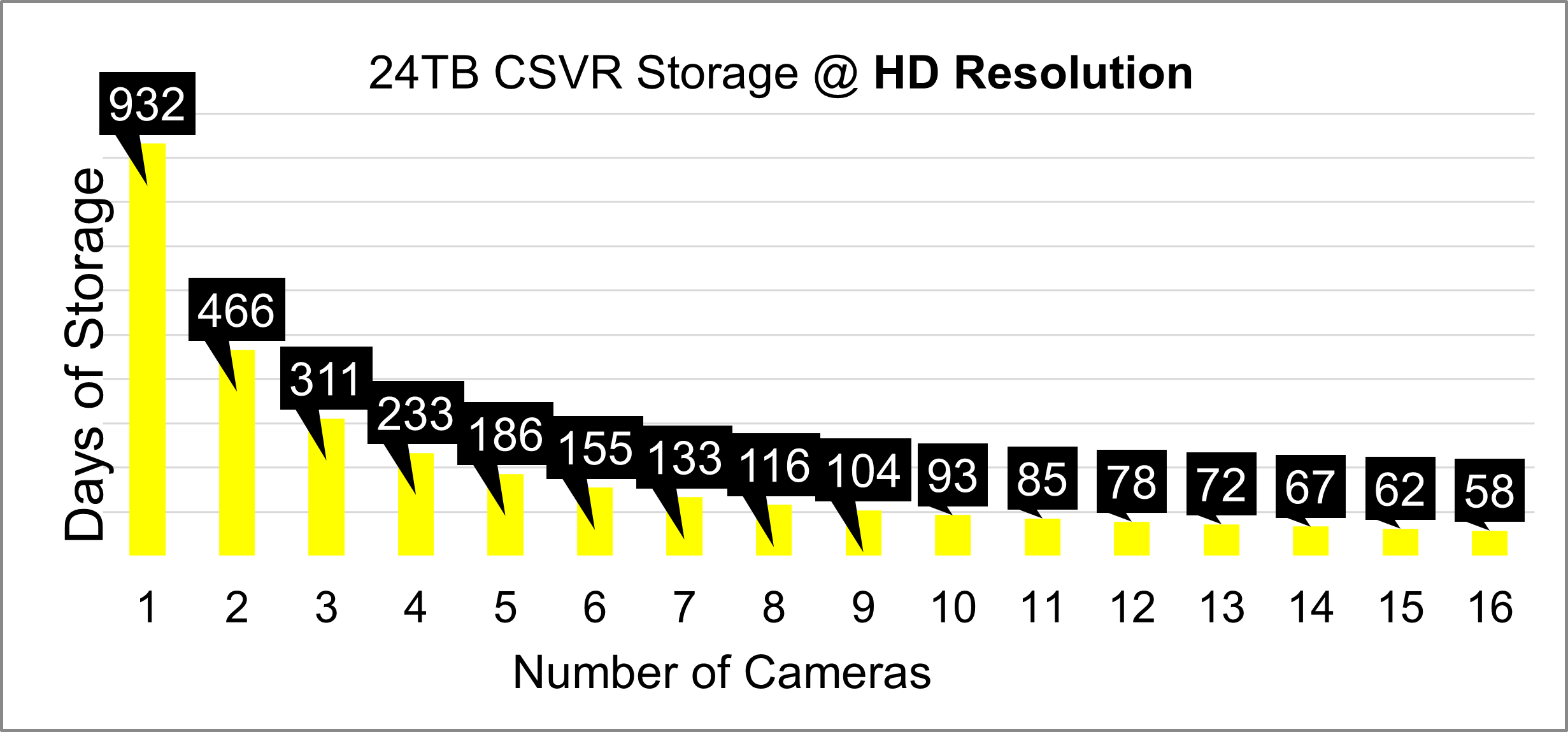
In a typical business setup with 8 cameras and a 24TB commercial streaming video recorder (CSVR), you could get around 116 days of recordings with HD resolution versus 29 days with 4K.
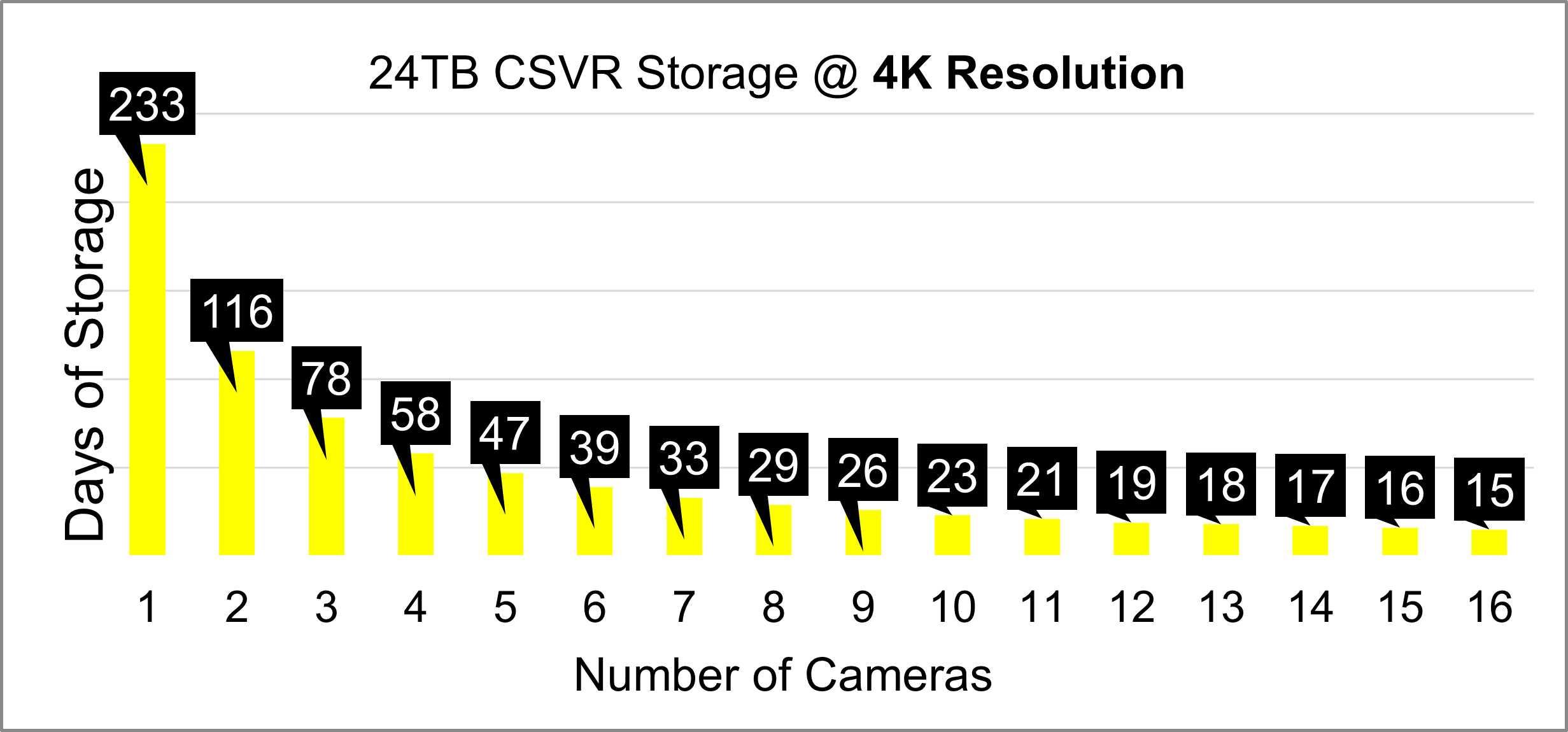
Something else to note is that the quality of the video is subject to the screen you’re watching it on, and possibly the internet speed you’re using to view it. Also, most onboard SD cards aren’t able to store videos with 4K resolution.
There are other factors like compression, bitrate, frame rate, and color depth that impact how your videos look and how much data storage they use, but that can get even more complicated, so we’ll save it for another day.
Frequently Asked Questions
What happens when storage fills up?
When storage gets full, the oldest footage is deleted to make room for the new footage. Most platforms also allow you to “lock” certain smart clips to prevent deletion and you can always download footage to another device to save it for later.
Can I upgrade storage later?
Yes, but upgrading storage for an NVR or SVR would require new equipment, so it’s best to purchase the correct amount upfront. SD cards can easily be added to individual cameras to increase their storage capacity later.
Can I buy my own SD card and put it in?
In most cases, yes, you can buy your own SD card and put it in, however it will likely require help from your provider to activate recording and enable remote access.
Can someone delete my footage remotely?
Only your service provider (after cancellation or for lack of payment) and those with your login information can delete your footage. Don’t share logins, keep your app behind your device’s lock screen, and enable 2-factor authentication to best secure your account.
Need More Help?
Navigating the world of video recording and storage can be challenging. DFW Security offers personalized system design, professional installation and ongoing local support to ensure you get the best protection for your home or business. Just call!

